AI Workflow Automation: Real Examples for E-commerce
AI workflow automation for e-commerce has moved from "nice to have" to standard practice for stores that want to compete on speed and customer experience without hiring a bigger team.
Below are five real, practical examples — not theoretical use cases — that online stores are using right now.
Why E-commerce Is a Natural Fit for AI Automation
E-commerce runs on repeatable, high-volume processes: every order follows the same basic steps, every customer question falls into a handful of categories, and every product needs the same kind of recommendation logic. That repetition is exactly what AI automation handles best.
Example 1 — Automated Order Processing & Fulfillment
Instead of manually reviewing every order, tagging it, and forwarding it to fulfillment, automation can:
- Automatically flag high-risk or fraudulent orders for review
- Route orders to the correct fulfillment center based on stock and location
- Trigger shipping confirmation and tracking emails without manual steps
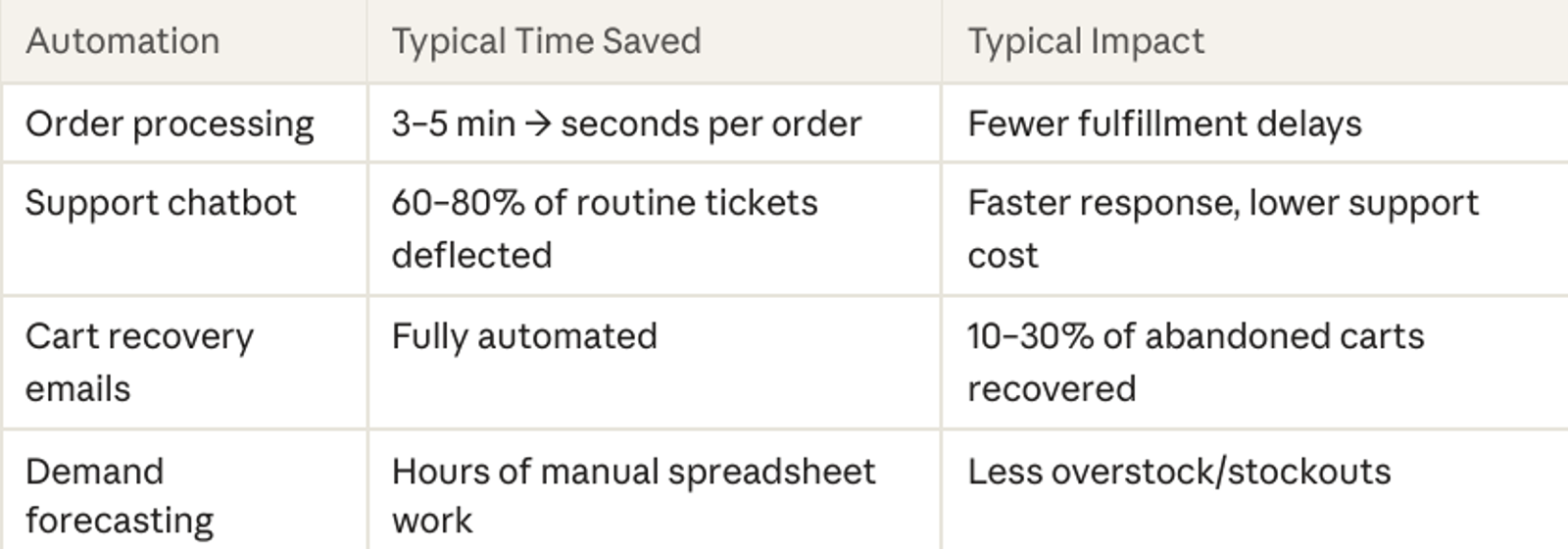
Result: stores typically cut order-processing time from several minutes to a few seconds per order.
Example 2 — AI Customer Support Chatbots
A large share of e-commerce support questions are repetitive: "Where's my order?" "What's your return policy?" "Do you ship internationally?" An AI chatbot trained on your store's policies can answer these instantly, 24/7, and only escalate complex issues to a human agent.
Example 3 — Personalized Product Recommendations
AI models analyze browsing and purchase behavior to surface "customers also bought" or "recommended for you" sections automatically, updating in real time as behavior changes — something a manually curated storefront can't keep up with.
Example 4 — Inventory & Demand Forecasting
Rather than guessing how much stock to reorder, AI forecasting tools analyze historical sales, seasonality, and trends to predict demand — reducing both stockouts (lost sales) and overstock (tied-up cash).
Example 5 — Automated Abandoned Cart Recovery
When a shopper leaves items in their cart, an automated workflow can send a timed follow-up sequence — a reminder email, then a discount nudge — without anyone manually tracking who abandoned what.
Key takeaway: None of these examples require replacing your team — they remove the repetitive middle step between "customer takes an action" and "business responds."
How Much Time and Money Do These Save?
Getting Started: A Simple Rollout Plan
1. Pick the single highest-volume repetitive task (usually support or order tagging)
2. Automate that one workflow first and measure the time saved
3. Use the freed-up time/data to justify automating the next process
4. Expand to forecasting and personalization once the basics are running smoothly
FAQ
Do I need a developer to set up e-commerce automation?
Some tools are no-code, but custom integrations (connecting your store, CRM, and support tools together) usually benefit from a developer to avoid brittle, manual workarounds later.
Which platforms support AI workflow automation?
Most major e-commerce platforms (Shopify, WooCommerce, custom storefronts) can integrate with AI chatbots, automation platforms, and custom-built workflow tools via APIs.
Conclusion
The e-commerce businesses growing fastest right now aren't necessarily working harder — they've automated the repetitive parts of the process so their team can focus on strategy and growth. Start with one workflow, prove the return, then expand.
Talk to CodeBlitz Labs about which automation would save your store the most time first